Your Dashboard
Understand the home screen, what each widget shows, and what to do about it.
Overview
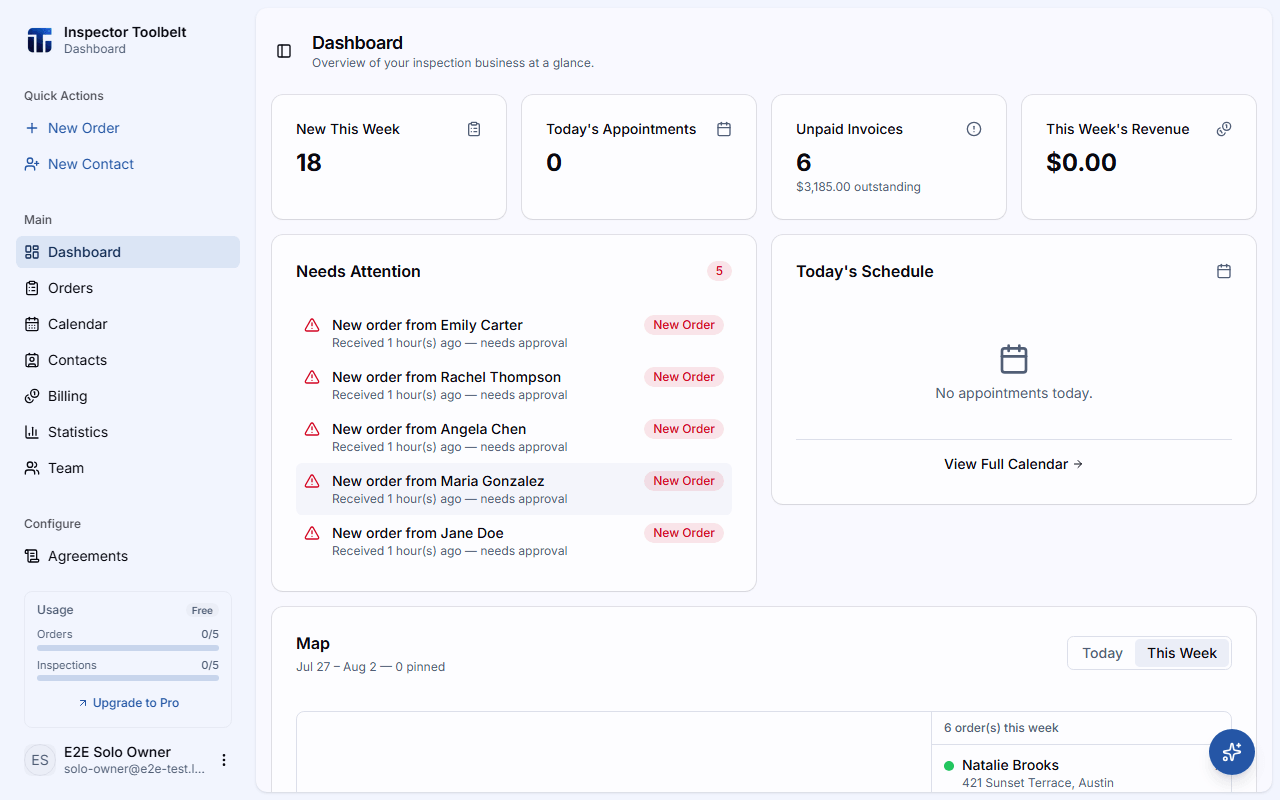
The dashboard is your home screen — a snapshot of your business right now. It's the first thing you see when you sign in. Every widget is a starting point: click through it to act on what it shows.
Setup Guide
Your setup guide is not on the dashboard. It lives in the Get started pill in the top bar, so it follows you onto every page.
The first time you land here it opens by itself, once, to show you where it is. It does not block the page.
Setup is three chapters: running your first Report, bringing your data over, and getting paid. See Setup Guide for what each one covers.
Team members
The setup guide is shown only to the account owner. If you joined someone else's team, you won't see it — your team owner handles setup.
Business Milestones
Once you finish the first setup chapter, a Business Milestones card appears on the dashboard. It tracks your first real-world wins:
- First booking — your first Order is created.
- First Report — you publish your first Report.
- First payment — you collect your first payment.
- First month's revenue — you earn revenue in a calendar month.
Each milestone checks itself off automatically. When you hit a new one, a brief celebration message confirms it.
KPI Cards
Four cards across the top give you the numbers at a glance. Each card is clickable:
| Card | What it shows | Click it to |
|---|---|---|
| New This Week | Orders that came in this week | Open your Orders list |
| Today's Appointments | How many appointments you have today | Open today in the calendar's day view |
| Unpaid Invoices | Unpaid and partially paid invoices, with the total outstanding | Open your unpaid invoices in Billing |
| This Week's Revenue | Payments received this week | Open your paid invoices in Billing |
Needs Attention
Your to-do list — items that are waiting on you, each with how long it's been waiting:
- New Order awaiting approval — click it to open the Order and approve it.
- Overdue invoice — shows days overdue and the amount; click it to open your unpaid invoices in Billing and follow up.
- Assignment needed (team accounts) — an approved Order with no Inspector assigned; click it to open the Order and assign someone.
When the list is empty you'll see "You're all caught up!" — nothing needs you.
Today's Schedule
Today's appointments in time order. Each row shows the time, address, client, service, price, and a Paid/Unpaid badge — a quick heads-up on who still owes before you head out. Click a row to open the Order, or View Full Calendar to see the whole day in the calendar.
Map
A map of your Orders for Today or This Week, with pins color-coded by status plus a pin for your company location. Click a pin to open a preview with View Order, Directions, and Street view — handy for planning your driving route for the day.
Make it yours
You can reorder or hide these widgets. See Preferences to customize your dashboard layout.
Next Steps
- Your First Order — put something on that empty dashboard
- Setting Up Your Profile — finish your account basics
- Inviting Team Members — bring your crew on board