Getting Paid
A plain-language look at how money moves from your client to your bank account.
Overview
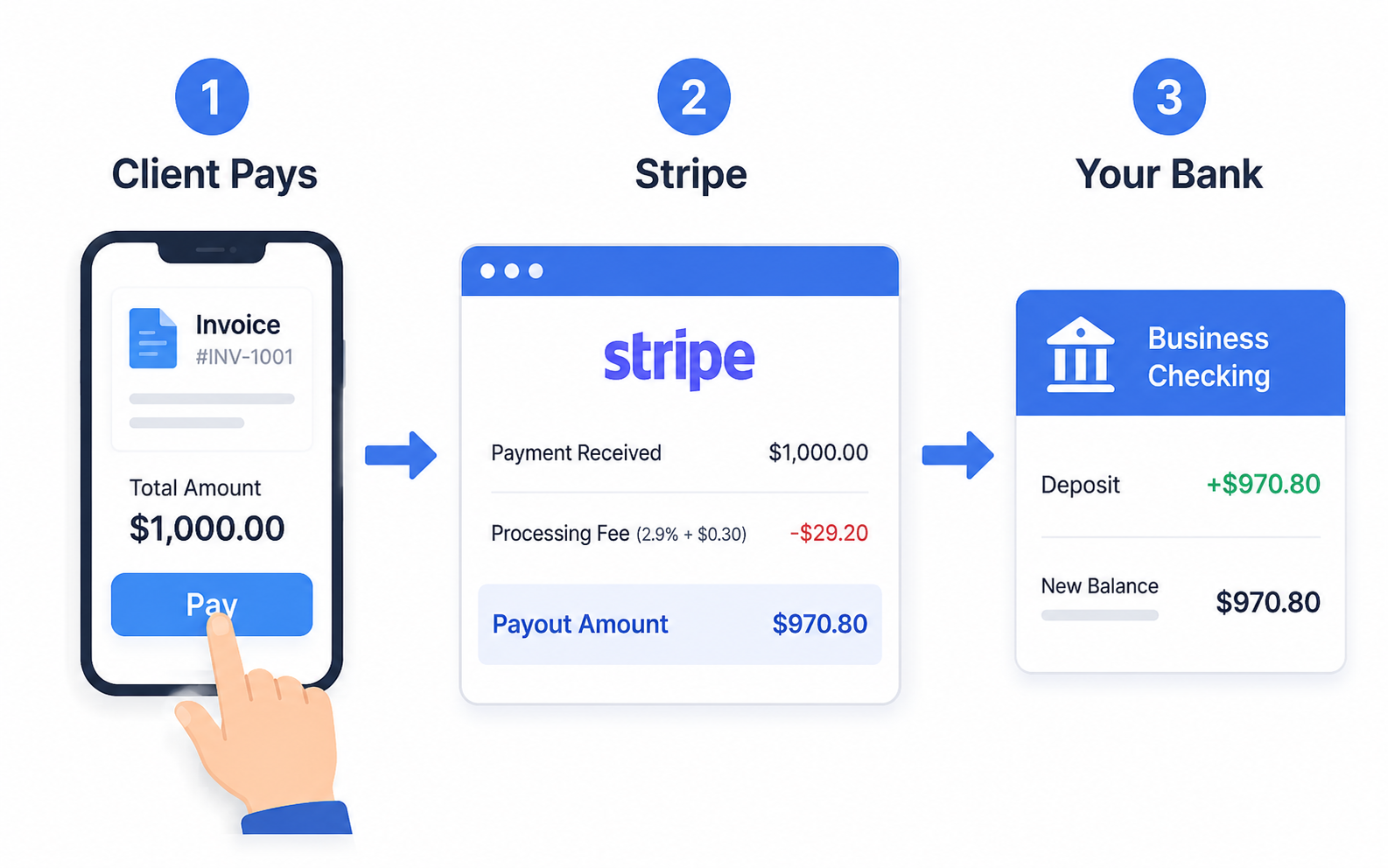
Money in ITB Dashboard follows one simple path: your client pays → the money lands in your Stripe account → Stripe sends it to your bank.
Stripe is the payment company that handles cards and online payments for your account. You connect your Stripe account once, and after that every online payment flows through it. See How Billing Works for how to connect.
The two ways clients pay online
They pay an invoice. You send an invoice from a Order, and your client gets an email with a secure payment link. They click it, pay with a card, and the invoice in your dashboard flips to Paid on its own. You get an email saying the payment arrived. See Creating Invoices.
If they pay by bank transfer instead, the money takes 3 to 5 business days to clear. The invoice shows Processing until then, and Paid once it lands. You get an email when the transfer starts and another when it settles. These payment emails always go to your account email, even if you have turned off automated notifications.
They pay while booking. If your public booking page collects payment, clients pay at the moment they book — before you've done anything. You choose how much: the full price, a percentage, or a fixed deposit amount. See Public Booking Page.
Either way, the money goes to the same place: your connected Stripe account.
From Stripe to your bank
Stripe holds incoming payments in your Stripe account, then transfers them to your bank. These transfers are called payouts.
Payout timing is controlled by Stripe, not by ITB Dashboard. To see when your next payout is coming, check BillingPayouts in your dashboard, or log in to your Stripe dashboard. More detail lives in Payments & Payouts.
What about cash and checks?
Plenty of clients still pay on the spot — cash, a check, Venmo, Zelle, or a bank transfer. That money never touches Stripe. It's already in your hand.
The dashboard just needs to know about it. You record the payment against the invoice, and the invoice shows Paid (or Partially Paid if it was only part of the total). See Recording a Payment.
Recording is not charging
Recording a payment never charges your client. It only tells the dashboard the money was already collected.
What refunds do
A refund sends money back to your client. You issue it from the invoice, for the full amount or just part of it. The invoice status changes to Refunded or Partially Refunded, so your records always match what really happened. See Refunds & Voids.
Refunds only work on invoices that were actually paid — you can't refund money you never received.